
Behaviour if calendar event already exists
An important question when linking items to events is
What happens when an item is already linked to an existing event?
We can do one of 3 things:
Do nothing
Create an additional event
Update the existing event in some way
1 & 2 are easy, but 3 represents a challenge as you have to consider exactly what to do and the behaviour you require.
The workflow actions allow the following:
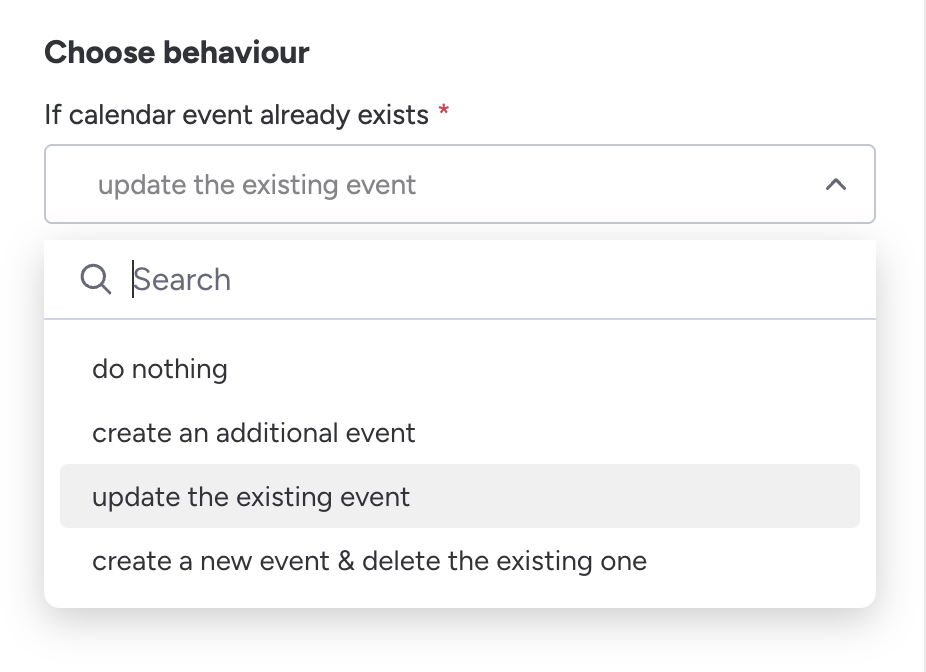
Behaviour on event updates
Below is the practical, real-world difference in Outlook calendar behaviour when you:
Update the existing event
Create a new event & delete the existing one
This matters a lot because Outlook handles identity, attendee user experience, notifications, and tracking differently.
1. Update the existing event
Behaviour for attendees
Attendees receive an “Updated meeting” email
Outlook keeps the same meeting ID (
iCalUIdstays the same).Attendees see this as the same meeting, just modified.
Track status (Accepted / Declined) is preserved.
Reminders and categorisation are generally preserved for attendees.
Behaviour in the organiser’s calendar
Same event ID continues to exist.
Any change you make (time, location, body, attendees, recurrence, etc.) updates the record.
No duplication.
Outlook links the update to the existing meeting.
Behaviour in attendees’ calendars
They keep the same appointment entry.
Their own modifications (notes, category colours, etc.) may remain, depending on Outlook client rules.
Email notifications
Depending on the type of change:
Time/location changes → Outlook usually forces a meeting update email.
Body changes → may or may not send an update (Outlook logic varies).
Minor metadata (categories, showAs, etc.) → usually no update.
2. Create a new event & delete the existing one
This produces completely different behaviour.
❗ Outlook treats this as TWO SEPARATE EVENTS:
One cancellation for the old event
One new meeting invitation for the new event
Behaviour for attendees
Attendees receive:
A meeting cancellation
A brand-new meeting invite
This is disruptive because:
Their accepted/declined state resets
Their notes/categories on the original meeting are lost
They must accept the new meeting again
It clutters their inbox with two notifications instead of one
Behaviour in the organiser’s calendar
You now have a new event ID / iCalUId.
Any references (like Teams meeting join URL if auto-created) may change.
Recurrence links break if this was a recurring event.
Behaviour in attendees’ calendars
The old meeting disappears entirely.
The new meeting creates a brand-new entry.
All tracking history is gone.
Email notifications
Outlook must send a cancellation
Outlook must send a new meeting invite
→ You cannot suppress these.
🚨 Key Differences Summarised
Behaviour | Update existing event | New event & delete existing |
|---|---|---|
iCalUId | Stays the same | Changes (treated as new meeting) |
Attendee status preserved | ✔️ Yes | ❌ No |
Attendee sees one update | ✔️ Yes | ❌ They see cancellation & new invite |
Attendee notes/categories retained | Often ✔️ | ❌ No |
Meeting link (Teams, etc.) | Usually retained | Often replaced |
Notification emails | 0–1 update emails | Always 2 emails (cancel + invite) |
Disruption level | Low | High |
🧠 When should you use each?
Use “update” when:
You want to modify an existing meeting
You want attendees to keep their acceptance state
You want to avoid sending two emails
You want the meeting identity (iCalUId) consistent
You support recurring events
Use “delete & create new” only when:
You truly want a separate meeting
Or you cannot modify the existing event due to permissions
Or you are programmatically duplicating an event
It is not recommended for normal updates.